


Solana remains one of the fastest-growing blockchain ecosystems, powering NFTs, DeFi apps, and instant payments. But with so much activity — and so many scams — securing your SOL in a hardware wallet is essential.
Unlike software wallets, hardware devices store your private keys offline, protecting them from phishing, malware, and exchange hacks. In this guide, I’ll walk you through the 6 best hardware wallets for Solana in 2026, including Ledger’s latest models, biometric options, and affordable cold storage solutions.
👉 If you’d like to compare both hardware and software wallets, check out our full article here: Best Solana (SOL) Wallets.
Best Solana Hardware Wallets
- Ledger Stax - Most Advanced Ledger Wallet for Solana ($399)
- Ledger Flex – Slim & Versatile Ledger Wallet for Solana ($249)
- Ledger Nano X – Proven Ledger Wallet for Solana ($149)
- D’CENT - Biometric Solana Hardware Wallet ($159)
- SecuX Neo X - Big Display Solana Wallet ($179)
- Ledger Nano S Plus - Budget-Friendly Ledger Wallet for Solana ($79)
1. Ledger Stax - Most Advanced Ledger Wallet for Solana ($399)

Ledger Stax is Ledger’s flagship hardware wallet, designed by the creator of the iPhone. It features a large curved E Ink touchscreen that stays visible even when powered off, so you can always see your balances and prompts at a glance.
Ledger devices can stake SOL directly in Ledger Live, which is the most secure setup for staking. Stax also supports browsing and displaying Solana NFTs directly on the device — a first for any Ledger product.
🔐 Key Features
✅ Large curved E Ink touchscreen
✅ CC EAL6+ secure element chip
✅ Clear Signing for transparent transactions
✅ Bluetooth & USB-C connectivity
✅ Solana staking via Ledger Live
✅ Manage Solana tokens and NFTs
✅ NFT viewing on the device
✅ Connects to Solana wallets such as Phantom and Solflare
✅ Connect and use Solana dApps
✅ Wireless charging
✅ Cross-platform: Windows, Mac, Ubuntu, iOS, Android
✅ Ideal For
- SOL holders who want the most advanced Ledger experience
- Investors staking Solana in Ledger Live
- NFT collectors who want to view NFTs on the hardware wallet
🎁 Special Offer
Using our exclusive link, you’ll get a free Magnet Shell case ($39 value) with your Ledger Stax.
To explore setup, staking, and NFT features in detail, you can read our full Ledger Stax review.
2. Ledger Flex – Slim & Versatile Ledger Wallet for Solana ($249)

Ledger Flex combines many of Stax’s premium features — like Clear Signing, Bluetooth, and an intuitive touchscreen — in a slimmer, more portable form factor.
Like all Ledger devices, Flex allows you to stake Solana securely in Ledger Live, and you can view Solana NFTs directly on the screen.
🔐 Key Features
✅ Touchscreen interface
✅ CC EAL6+ secure element
✅ Clear Signing for all transactions
✅ Bluetooth & USB-C support
✅ Solana staking in Ledger Live
✅ Manage Solana tokens and NFTs
✅ NFT display on the device
✅ Connects to Solana wallets such as Phantom and Solflare
✅ Connect and use Solana dApps
✅ Cross-platform: Windows, Mac, Ubuntu, iOS, Android
✅ Ideal For
- SOL holders who prefer a slim, premium design
- Investors staking Solana securely
- NFT collectors wanting to browse NFTs on the device
🎁 Special Offer
Use our exclusive link to access Ledger’s bonus perks — like free Bitcoin or discounted bundles.
To learn more about Ledger Flex and see how it works with Solana, check out our complete review.
3. Ledger Nano X – Proven Ledger Wallet for Solana ($149)
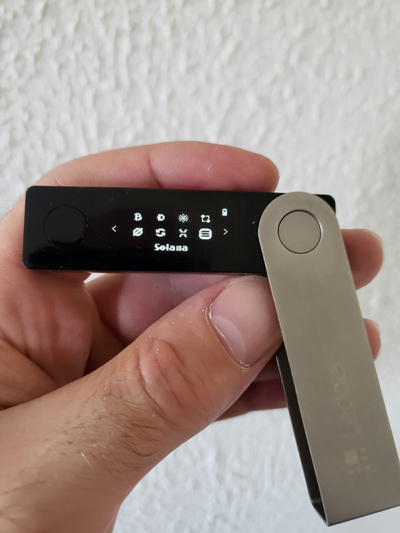
Ledger Nano X is one of the most popular hardware wallets ever created, combining Bluetooth convenience and strong security in a compact form.
Nano X supports staking Solana directly in Ledger Live, making it one of the most reliable ways to earn staking rewards offline.
🔐 Key Features
✅ CC EAL5+ secure element
✅ Transaction confirmation on-screen
✅ Bluetooth & USB-C connectivity
✅ Solana staking via Ledger Live
✅ Manage Solana tokens and NFTs
✅ Connects to Solana wallets such as Phantom and Solflare
✅ Connect and use Solana dApps
✅ Cross-platform: Windows, Mac, Ubuntu, Android, and iOS
✅ Ideal For
- SOL holders who want to manage SOL and tokens across multiple devices
- Users staking Solana in Ledger Live
- Investors preferring a proven, compact design
🎁 Special Offer
Use our exclusive link to access Ledger’s bonus perks — like free Bitcoin or discounted bundles.
For step-by-step setup and staking instructions, read our in-depth Ledger Nano X review.
4. D’CENT - Biometric Solana Hardware Wallet ($159)

D’CENT is the only hardware wallet with a built-in fingerprint scanner, providing fast authentication and transaction signing. With Bluetooth connectivity and a nice OLED display, D’CENT is designed primarily for secure use on iOS and Android mobile devices.
D’CENT supports Solana management through its official mobile app and integrations with third-party wallets. All transaction approvals happen securely on the device, keeping your private keys offline.
🔐 Key Features
✅ Biometric fingerprint unlocking and signing
✅ CC EAL5+ secure element
✅ OLED display with 4-button navigation
✅ Bluetooth connectivity (mobile-only)
✅ Manage Solana tokens and NFTs
✅ Connect and use Solana dApps
✅ Native Solana support through the D’CENT mobile app (iOS & Android only)
✅ Ideal For
- SOL holders who want biometric hardware security
- Users who prefer mobile-only Bluetooth management
- Investors seeking fast, fingerprint-based transaction signing
🎁 D’CENT Hardware Wallet Special Offer
Thanks to our exclusive link, you can get the D’CENT Biometric Wallet for $30 less than the regular price. No need to enter a coupon — the discount is automatically applied. It’s a great deal if you’re looking for a secure, mobile-ready wallet in 2026.
You can read our full D’CENT review to see setup guides and supported networks.
5. SecuX Neo X - Big Display Solana Wallet ($179)
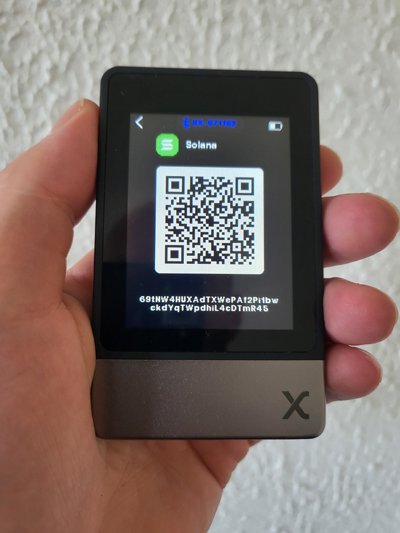
SecuX Neo X stands out with its big 2.8” color touchscreen, making it one of the easiest hardware wallets to navigate. This spacious display simplifies transaction signing and setup, especially for beginners.
SecuX Neo X is designed primarily for mobile use via Bluetooth, allowing you to manage Solana securely from your smartphone. You can control your wallet using the SecuX mobile app, view your Solana NFTs directly on the big touchscreen, and use WalletConnect to access Solana dApps safely.
🔐 Key Features
✅ Big 2.8” color touchscreen for clear navigation
✅ CC EAL5+ secure element
✅ Bluetooth connectivity (mobile-only)
✅ Manage Solana tokens and NFTs
✅ Solana management through SecuX mobile app
✅ WalletConnect support for connecting to Solana dApps
✅ Connect and use Solana dApps
✅ Compatible with Android and iOS
✅ Ideal For
- SOL holders who want a big display that’s easy to read
- Users who prefer mobile-first Bluetooth management
- Investors accessing Solana dApps with WalletConnect
🎁 SecuX Neo X Special Offer
Use our exclusive link to get 15% OFF your purchase. No need to enter a code — the discount is automatically applied when you add the SecuX Neo X to your cart. That’s a savings of over $26.
For a detailed walkthrough of features and Solana support, read our complete SecuX Neo X review.
6. Ledger Nano S Plus - Budget-Friendly Ledger Wallet for Solana ($79)
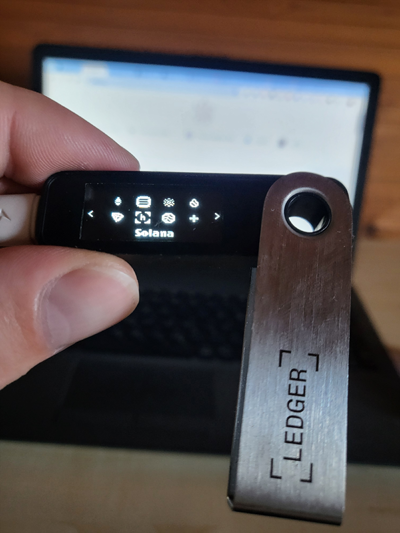
Ledger Nano S Plus is Ledger’s most affordable hardware wallet, giving you secure Solana storage without the premium price tag. It uses the same CC EAL5+ secure element as Nano X but drops Bluetooth in favor of a simple USB connection.
Nano S Plus supports staking Solana directly in Ledger Live, making it one of the most secure and beginner-friendly staking setups available.
🔐 Key Features
✅ CC EAL5+ secure element
✅ USB-C connectivity (no Bluetooth)
✅ Solana staking in Ledger Live
✅ Manage Solana tokens and NFTs
✅ Connects to Solana wallets such as Phantom and Solflare
✅ Connect and use Solana dApps
✅ Transaction confirmation on-screen
✅ Compatible with Windows, Mac, Ubuntu, Android (no iOS)
✅ Ideal For
- SOL holders who want Ledger security at the lowest price
- Users staking Solana safely in Ledger Live
- Investors who prefer USB-only connections over Bluetooth
🎁 Ledger Nano S Plus Special Offer
By using our exclusive link, you’ll get access to any bonus perks Ledger sometimes offers — such as free Bitcoin, discounted bundles, or early access deals.
To learn more about Ledger Nano S Plus, read our full review.
