


The SecuX Neo X is a hardware wallet I’ve been using over the past year to test how well it handles everyday crypto activity — from simple transfers to using dApps. With its 2.8″ color touchscreen, EAL5+ secure element, and smooth mobile connectivity, it aims to combine strong security with ease of use.
In practice, it delivers a fast and intuitive experience, whether you’re sending tokens, checking balances, or connecting to Web3 apps through WalletConnect. It’s clearly designed for mobile-first users who want a secure wallet without the usual friction of hardware devices.
Key Takeaways
- Large touchscreen experience: The 2.8″ color display makes navigation and transaction confirmation much easier than button-based wallets
- Mobile-first usability: Designed for iOS and Android with fast Bluetooth pairing and a smooth companion app
- Strong multichain support: Supports 10,000+ coins, tokens, and NFTs across major networks
- Built-in Web3 access: WalletConnect and dApp browser allow easy interaction with DeFi and NFT platforms
- Premium extras included: Comes with a metal backup kit and engraving tool at no additional cost
- Limitation: No desktop or web app support, which may not suit users who prefer managing assets on a computer
✅ Verdict
- Best for: Mobile-first users who want a touchscreen hardware wallet for everyday crypto management
- Main strength: Large color display combined with smooth mobile experience makes transactions simple and intuitive
- Main drawback: No desktop support, limiting flexibility compared to ecosystem-heavy wallets like Ledger
- Who should use it: Users who want a secure, easy-to-use hardware wallet with strong multichain support and a more visual, touchscreen-based experience
💰 Price: The SecuX Neo X is typically priced around $119, positioning it as a mid-range hardware wallet with premium features like a large touchscreen, strong multichain support, and a mobile-first experience.
👉 🔗 Get 50% Off — Pay Only $59 (Limited Offer)
🧭 Jump to Section
- Key Specs at a Glance
- What’s New in 2026
- Design & Build Quality
- Setup & Day-to-Day Use
- Web3 & dApp Access
- How To Manage NFTs on SecuX Neo X
- Security Architecture
- Supported Coins & Ecosystem
- Performance & Battery Life
- Backup Tools
- Pros & Cons
- Who Should Use the SecuX Neo X
- My Experience With SecuX Neo X
- SecuX Neo X Discount Code
Key Specs at a Glance
Display: 2.8″ LCD color touchscreen (360 × 240 px)
Security Chip: Infineon SLE 97 secure element (EAL5+ certified)
Battery: 600mAh lithium-ion battery (can last for weeks between charges)
Connectivity: Bluetooth 5.0 (encrypted) and USB-C (charging only)
OS Compatibility: iOS 12+ and Android 6+ (mobile-first design)
Supported Assets: 10,000+ coins, tokens, and NFTs
Backup Included: X-SEED metal recovery kit with engraving pen
What’s New in 2026
In 2026, SecuX continued to improve firmware performance and expanded token compatibility, further streamlining the user experience.
Design & Build Quality
The Neo X features a 2.8-inch color touchscreen that makes it easy to navigate menus and clearly confirm transactions. Unlike button-based devices, it doesn’t slow you down. The screen is responsive, easy to read, and paired with a sturdy build that feels compact yet premium.
Setup & Day-to-Day Use
Setup is simple and mobile-friendly:
1. Charge Neo X using the USB-C cable (2 hours).
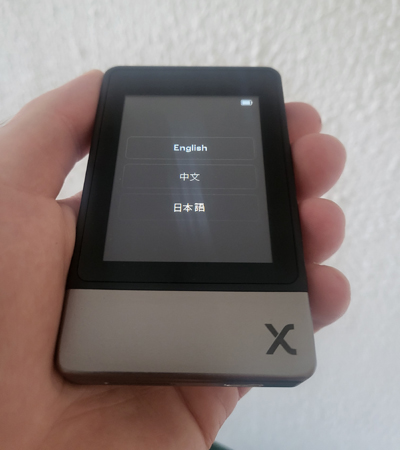
2. Power it on, and choose your language.
3. Set a PIN code with the dynamic keypad.

4. Create a wallet and write down your 12 or 24-word recovery phrase.
5. Pair the device with the SecuX Wallet app (for iOS and Android) via encrypted Bluetooth.
6. Done.
Once paired, you can view your portfolio, send/receive tokens, and interact with dApps — all from your phone.


Web3 & dApp Access
The Neo X gives you full dApp access through WalletConnect and its built-in dApp explorer. You can securely connect to DeFi protocols and NFT marketplaces directly from your mobile app.
How To Manage NFTs on SecuX Neo X
Neo X supports NFTs on Ethereum, BNB Chain, Polygon, Solana, and the XDC Network. If you already own NFTs, just send them to your new address.
If you want to buy and view NFTs directly on your hardware wallet, follow these steps:
1. Open the dApps explorer in the SecuX Wallet app.
2. Choose a supported NFT marketplace.
3. Connect via WalletConnect.
4. Buy your NFT — it will appear in your Gallery tab.
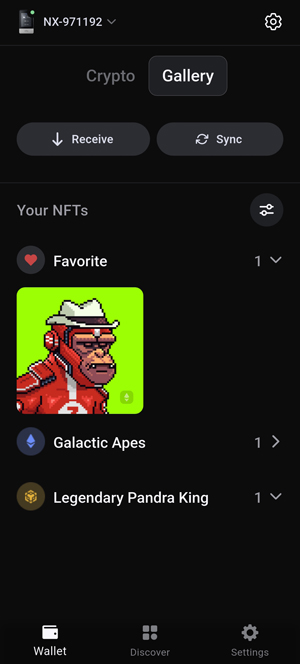
5. Mark it as “Favorite” or “Set as Profile.”
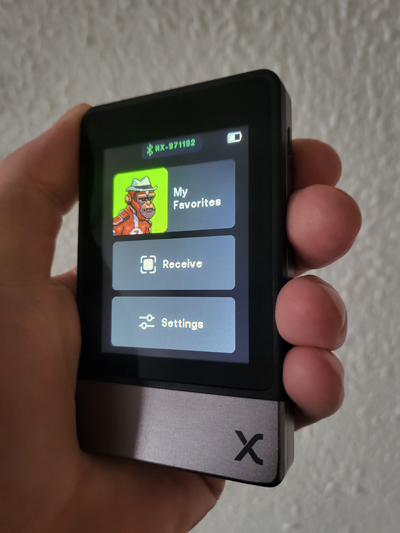
6. Sync your device by tapping the “Sync” button — your NFT will now appear on the Neo X screen.
Security Architecture
The Neo X uses the Infineon SLE 97 chip (EAL 5+), a standard used in high-security environments. It also includes dynamic PIN keypad entry and auto-reset after failed login attempts.
Supported Coins & Ecosystem
With support for over 10,000 assets, Neo X covers:
- Major coins: BTC, ETH, BNB, LTC, XRP, SOL, TRX
- Token standards: ERC-20, BEP-20, TRC-20, SPL
- Multichain compatibility: Ethereum, BNB Chain, Tron, Solana, Polygon, and more
You can see a full list of supported coins and tokens here. SecuX continues to push firmware updates to keep token support fresh and relevant.
Performance & Battery Life
The 600mAh battery can last for weeks between charges. During testing, Bluetooth pairing was instant, app syncs were fast, and transaction signing felt natural.
You’re not left waiting or guessing — the interface feels responsive and polished.
Backup Tools
Included in the box is the X-SEED metal backup kit and an engraving pen. This offline backup solution is waterproof, fire-resistant, and designed to permanently store your seed phrase – no fragile paper to worry about.
Pros & Cons
Pros
✔️ Large color touchscreen (easy navigation)
✔️ NFT preview directly on the device
✔️ Robust multichain support
✔️ Durable metal recovery kit included
Cons
❌ No desktop functionality (mobile-first by design)
Who Should Use the SecuX Neo X
The Neo X is ideal for crypto holders who want secure, mobile-first access to their assets without extra complexity. Its large touchscreen, strong multichain support, and built-in scam protection make it a practical choice for everyday use — whether you’re checking balances, sending crypto, or signing transactions with confidence.
It’s not designed for desktop power users, but if you want something secure, portable, and easy to use, this wallet hits the mark.
My Experience With SecuX Neo X
I had a really good experience with SecuX’s V20 model, so I was genuinely excited to try out the Neo X. After setup, the firmware update took just a couple of clicks and less than a minute — which already gave me a good feeling about this wallet.
Thanks to its sharp touchscreen and excellent Bluetooth connection with the mobile app, everything from signing transactions to using dApps felt smooth and fast. I now keep a chunk of my stablecoin holdings on the Neo X, since its broad network support makes it easy to move assets around — like USDT on Tron and USDC on Solana.
I’m not a big fan of NFTs, but my GalacticApe (which I bought on Magic Eden for about $10 worth of ETH) looks cool on the device screen.
All in all, the Neo X has proven to be a fast, secure, and easy-to-use companion for my everyday crypto activity.
🎁 SecuX Neo X Discount Code
With our exclusive link, you can get 50% off and pay just $59 (limited offer) for the SecuX Neo X.
