


If you’re looking for a safe and secure way to store your cryptocurrencies in 2026, hardware wallets remain the most reliable option for protecting your assets long term.
We’ve been reviewing hardware wallets since 2019, and this year’s rankings reflect both long-term experience and the latest devices available. For 2026, we gave the top two spots to Ledger’s newer models — Ledger Flex and Ledger Stax — thanks to their improved usability, strong security, and broader feature set.
We also ranked D’CENT highly as a compact biometric hardware wallet with a solid user base and continued product development. In addition, we included SecuX Neo X and SecuX V20 as lower-cost alternatives that are currently available at discounted prices, making them appealing options for users who want a safe hardware wallet with a larger touchscreen experience.
At the same time, older and well-proven models still deserve a place. That’s why Ledger Nano X remains one of the most trusted options for everyday use, while Ledger Nano S Plus continues to stand out as an affordable choice for secure long-term storage.
Unlike software or exchange-based wallets, hardware wallets keep your private keys offline, reducing exposure to hacks, phishing attacks, and malware. Many modern devices also support staking, NFT management, and DeFi access, allowing you to interact with blockchain ecosystems while staying in full control of your assets.
Below, we’ve selected the best hardware wallets in 2026 based on security, usability, features, long-term reliability, and overall value.
Best Hardware Wallets for 2026
- Ledger Flex – Best Value Hardware Wallet
- Ledger Stax – Best Premium Hardware Wallet
- D’CENT – Best Mobile-First Hardware Wallet
- SecuX Neo X – Best Touchscreen Wallet for NFTs
- SecuX V20 – Best Budget Touchscreen Wallet
- Ledger Nano X – Most Trusted Hardware Wallet for Everyday Use
- Ledger Nano S Plus – Best Budget Hardware Wallet for Secure Storage
Which Hardware Wallet Should You Choose?
Choosing the right hardware wallet depends on how you use crypto:
- 👉 Best overall value: Ledger Flex – modern features with strong security
- 👉 Premium experience: Ledger Stax – best design and usability
- 👉 Most trusted: Ledger Nano X – reliable and widely supported
- 👉 Best budget option: Ledger Nano S Plus – affordable and secure
- 👉 Best for mobile users: D’CENT – biometric + phone-first experience
- 👉 Best for visual clarity: SecuX Neo X – clear and intuitive interface
- 👉 Best budget touchscreen: SecuX V20 – large screen at a lower price
👉 Limited-time offer (April 2026): Ledger is currently offering up to $80 in free Bitcoin with Flex and Stax — see full details.
1. Ledger Flex – Best Value Hardware Wallet
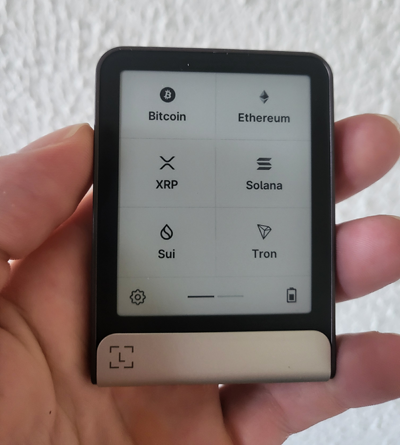
Ledger Flex is one of the best hardware wallets in 2026 for users who want premium security and modern features without paying for a flagship device. It delivers nearly everything found in Ledger Stax, but in a more compact and affordable form.
It features a CC EAL6+ Secure Element, Clear Signing, and a 2.84″ E Ink touchscreen, giving you full visibility when approving transactions. With Bluetooth 5.2, NFC, and USB-C connectivity, Flex works seamlessly across desktop and mobile.
In practice, this makes it an excellent choice for users who want to secure assets long-term while still interacting with staking, NFTs, and DeFi apps through Ledger Live.
My Experience With Ledger Flex
After using the Flex daily, it feels much closer to the Stax than expected. The touchscreen is responsive, navigation is smooth, and signing transactions is fast and intuitive.
Even though the screen is smaller than the Stax, it never felt limiting in real use. I was able to comfortably manage my portfolio, stake assets, and interact with dApps on both desktop and mobile without friction.
What stood out most is how balanced the device feels — you’re getting the same core security and Ledger Live experience as the Stax, just without the extras like wireless charging. For most users, that trade-off makes the Flex a smarter choice.
Pros:
✔️ CC EAL6+ Secure Element for top-tier security
✔️ Clear Signing for transparent transaction verification
✔️ Bluetooth, NFC, and USB-C connectivity
✔️ Always-on E Ink touchscreen
✔️ Supports 5,500+ coins, tokens, and NFTs
Cons:
❌ No wireless charging
❌ Smaller screen than Ledger Stax
✅ Verdict
- Best for: Users who want a modern hardware wallet with a touchscreen and strong all-around features
- Main strength: Combines CC EAL6+ security, Clear Signing, and a responsive E Ink touchscreen with smooth desktop and mobile connectivity
- Main drawback: Lacks premium extras like wireless charging and has a smaller screen compared to Ledger Stax
- Who should use it: Users looking for a balanced hardware wallet that supports long-term storage, staking, NFTs, and dApp interaction without paying for a flagship device
🔗 View full list of supported cryptocurrencies
Price: $249
🎁 Ledger Flex Special Offer
By using our exclusive link, you’ll get access to any bonus perks Ledger occasionally offers—like free Bitcoin, discounted bundles, or early access deals.
2. Ledger Stax – Best Premium Hardware Wallet

Ledger Stax is the most advanced hardware wallet in 2026, built for users who want top-tier security combined with a refined, modern user experience. Designed by Tony Fadell (creator of the iPod), it introduces a 3.7″ curved E Ink touchscreen, wireless charging, and a completely upgraded interface.
It runs on Ledger’s CC EAL6+ Secure Element, supports Clear Signing, and integrates seamlessly with Ledger Live, allowing you to manage crypto, stake assets, and interact with dApps safely across desktop and mobile.
In practice, Stax is ideal for users who want a daily-use hardware wallet that feels intuitive, fast, and visually clear, especially when dealing with complex transactions or DeFi interactions.
My Experience With Ledger Stax
After using the Nano X for years, the Stax feels like a completely different level of usability. The touchscreen makes navigation much smoother, and Clear Signing finally makes it easy to understand exactly what you’re approving — which adds a lot of confidence when interacting with dApps.
Bluetooth performance has been reliable, and everything from app installs to daily transactions feels fast and stable. I haven’t experienced the connectivity issues that sometimes happened with older devices.
The Security Key feature is something I ended up using more than expected — especially for securing exchange logins and approvals. It adds another practical layer beyond just storing crypto.
That said, app storage is still somewhat limited. Around 10 apps is enough for most users, but if you manage many networks, you’ll still need to rotate apps occasionally.
Overall, Stax feels like a premium device you actually enjoy using daily, not just something you store away.
Pros:
✔️ Large curved E Ink touchscreen for intuitive navigation
✔️ Clear Signing for full transaction transparency
✔️ CC EAL6+ Secure Element (top-tier security)
✔️ Bluetooth + USB-C + wireless Qi charging
✔️ Security Key app for login protection
✔️ Supports 5,500+ coins, tokens, and NFTs
Cons:
❌ Premium price compared to other wallets
❌ Limited app storage (~10 apps at once)
❌ No backlight (harder to use in low light)
✅ Verdict
- Best for: Users who want a premium hardware wallet with a modern design and the most refined user experience
- Main strength: Large curved E Ink touchscreen combined with Clear Signing and strong security makes transaction verification much clearer and easier
- Main drawback: Higher price and limited app storage compared to expectations for a flagship device
- Who should use it: Users who actively interact with crypto, dApps, and multiple networks and want a more intuitive, daily-use hardware wallet
🔗 View full list of supported cryptocurrencies
Price: $399
🎁 Ledger Stax Special Offer
By using our exclusive link, you’ll get the Magnet Shell – Midnight Black (a $39 value on Ledger’s shop) for free with your Ledger Stax.
3. D’CENT – Best Mobile-First Hardware Wallet

D’CENT is one of the most convenient hardware wallets in 2026, built specifically for users who manage crypto directly from their phone. Its standout feature is fingerprint authentication, which makes unlocking the device and approving transactions faster and more intuitive than traditional PIN-only wallets.
It uses a certified EAL5+ Secure Element, keeping your private keys fully offline, while Bluetooth connectivity allows seamless pairing with the D’CENT mobile app on both iOS and Android.
In practice, D’CENT is ideal for users who frequently interact with dApps, DeFi platforms, and multichain ecosystems without relying on desktop setups.
My Experience With D’CENT
D’CENT is easily one of the most convenient hardware wallets I’ve used for daily transactions. The Bluetooth connection works smoothly on both Android and iOS, and I’ve found it more stable than some other mobile wallet setups.
The fingerprint authentication makes a noticeable difference — instead of entering a PIN every time, you can approve transactions almost instantly, which speeds up everyday usage.
I’ve used it heavily on BNB Chain and other dApp ecosystems, and the connection process is quick and reliable. The built-in dApp browser and WalletConnect support make it easy to explore DeFi platforms directly from the app.
Another underrated feature is the airdrop partnerships inside the app, which occasionally give access to extra rewards just for holding certain assets.
Pros:
✔️ Biometric fingerprint authentication for fast approvals
✔️ EAL5+ Secure Element for strong hardware security
✔️ Smooth Bluetooth pairing with mobile devices
✔️ Built-in dApp browser + WalletConnect support
✔️ Supports 3,900+ coins and tokens
Cons:
❌ No desktop/web app support
❌ Smaller screen compared to touchscreen wallets
✅ Verdict
- Best for: Users who want a convenient hardware wallet with fast and easy access
- Main strength: Biometric fingerprint authentication combined with smooth connectivity makes everyday transactions faster and more convenient
- Main drawback: No desktop or web app support, limiting flexibility for some users
- Who should use it: Users who want a compact hardware wallet for fast and secure everyday transactions
Price: $159
🎁 D’CENT Special Offer
Thanks to our exclusive link, you can get the D’CENT Biometric Wallet for $30 less than the regular price. No need to enter a coupon — the discount is automatically applied.
4. SecuX Neo X – Best Touchscreen Wallet for NFTs
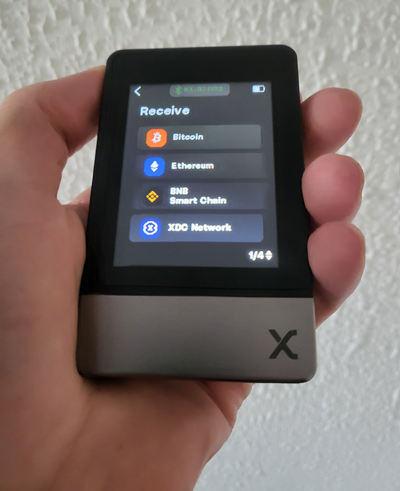
SecuX Neo X is a great choice in 2026 for users who want a large, easy-to-use touchscreen combined with strong security and multichain support. It features a 2.8″ color touchscreen, an EAL5+ Secure Element, and smooth Bluetooth connectivity for managing crypto directly from your phone.
Unlike button-based devices, the Neo X focuses on clarity and simplicity, making it easier to review transactions, manage tokens, and interact with dApps through WalletConnect.
In practice, this makes it ideal for users who want a visual, straightforward hardware wallet experience, especially when dealing with multiple chains or frequent transactions.
My Experience With SecuX Neo X
After having a good experience with the SecuX V20, I was curious to see how the Neo X performs — and it didn’t disappoint. Setup was quick, and even firmware updates took less than a minute, which immediately gave a good first impression.
The touchscreen is sharp and responsive, and combined with the stable Bluetooth connection, everything from signing transactions to using dApps felt smooth and fast.
I’ve been using the Neo X mainly for stablecoin management across different networks, like USDT on Tron and USDC on Solana. Its broad multichain support makes moving assets around simple and efficient.
I’m not heavily into NFTs, but I tested it anyway — and seeing an NFT displayed directly on the device is a nice touch that adds personality to the wallet.
Overall, the Neo X feels like a practical, everyday wallet that prioritizes usability without sacrificing security.
Pros:
✔️ Large 2.8″ color touchscreen for easy navigation
✔️ EAL5+ Secure Element for strong security
✔️ Smooth Bluetooth connection with mobile app
✔️ Supports 10,000+ coins, tokens, and NFTs
✔️ NFT preview directly on the device
Cons:
❌ No desktop support (mobile-first only)
❌ No native staking inside the app
✅ Verdict
- Best for: Users who prefer a hardware wallet with a large, easy-to-use touchscreen
- Main strength: Clear 2.8″ color touchscreen combined with strong multichain support makes managing assets and reviewing transactions simple
- Main drawback: No native staking support and limited desktop functionality
- Who should use it: Users who want a visual, user-friendly hardware wallet for managing multiple assets and interacting with dApps
Price: $59
🎁 SecuX Neo X Special Offer
Use our exclusive link to get access to all ongoing promotions, including free crypto rewards, discounted bundles, and limited-time offers.
5. SecuX V20 – Best Budget Touchscreen Wallet
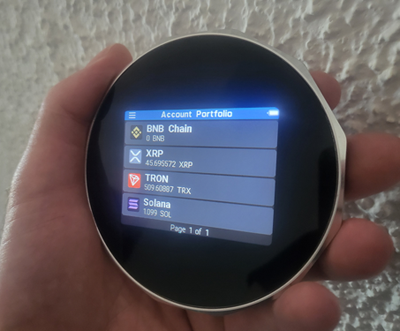
SecuX V20 is one of the best affordable hardware wallets in 2026, offering a large touchscreen experience without the premium price tag. It combines a 2.8″ color display, EAL5+ Secure Element, and support for 10,000+ cryptocurrencies, making it a strong choice for both beginners and experienced users.
With Bluetooth and USB-C connectivity, the V20 works across mobile and desktop environments, giving you flexibility when managing your crypto portfolio.
In practice, this makes it a great option for users who want a clear, visual interface for transactions without spending on higher-end devices like Ledger Stax.
My Experience With SecuX V20
I’ve been using the SecuX V20 for a while, and it’s one of the most straightforward hardware wallets I’ve tested. The large touchscreen makes reviewing addresses and signing transactions feel natural, especially compared to button-based devices.
The Bluetooth connection with the mobile app works smoothly, and setup is quick and beginner-friendly. I had no issues pairing it or managing assets right away.
Battery life has also been impressive — I usually only need to charge it about once every 10 days, even with regular use.
I’ve connected it to WalletConnect and MetaMask, and everything worked reliably when interacting with dApps. Transactions go through without issues, and the overall experience feels stable and polished.
Pros:
✔️ Large 2.8″ color touchscreen for easy navigation
✔️ EAL5+ Secure Element for secure key storage
✔️ Works on both desktop and mobile
✔️ Supports 10,000+ coins and tokens
✔️ Smooth dApp access via WalletConnect
Cons:
❌ No native staking inside the app
❌ Bulkier design compared to compact wallets
✅ Verdict
- Best for: Users who want an affordable hardware wallet with a large touchscreen
- Main strength: Large 2.8″ color display combined with broad multichain support makes managing assets simple and easy to follow
- Main drawback: Software experience is less refined compared to more established hardware wallet ecosystems
- Who should use it: Users who want a budget-friendly hardware wallet with a large, easy-to-use touchscreen
Price: $89
🎁 SecuX V20 Special Offer
Use our exclusive link to get to get access to all ongoing promotions, including free crypto rewards, discounted bundles, and limited-time offers.
6. Ledger Nano X – Most Trusted Hardware Wallet for Everyday Use
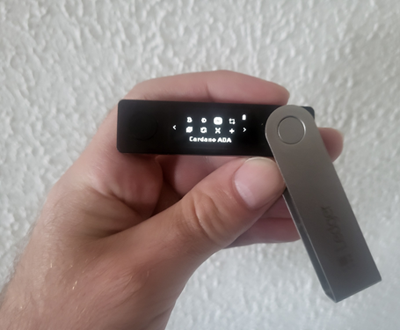
The Ledger Nano X remains one of the most trusted and widely used hardware wallets in 2026—a proven companion for securing your crypto. It’s built around the CC EAL5+ Secure Element chip and Ledger’s proprietary BOLOS operating system, ensuring your private keys never leave the device. Even Bluetooth connections are fully encrypted and require on-device confirmation for every transaction.
Compatibility:
Desktop and mobile (iOS & Android) with Bluetooth and USB-C.
Unlike the Ledger Stax or Flex, the Nano X doesn’t have a touchscreen. Instead, it relies on its 128×64 px OLED display and two physical buttons for navigation and signing. While this means less visual space, you still get access to all Ledger Live features—staking, swapping, NFT management, and dApps access—just like any premium Ledger model.
Whether you’re staking coins directly in Ledger Live, swapping tokens via Changelly, Exodus, or Paraswap, or connecting to dApps, the Nano X handles it all with ease. In my own years of daily use, it has proven incredibly reliable, with smooth performance, zero failed transactions, and excellent firmware support from Ledger.
My Experience With Ledger Nano X
The Ledger Nano X has been my most reliable hardware wallet over the years. What stands out is its durability — I’ve carried it while traveling, kept it in bags and pockets, and used it regularly, and it still looks and works like new.
In practice, it has handled everything I’ve thrown at it. I’ve used it to manage a wide range of crypto assets, and transactions have always gone through smoothly — even during network congestion or major updates.
One feature I rely on often is the ability to swap assets directly within Ledger Live. It simplifies the process and avoids the need to move funds through centralized exchanges.
Another major advantage is compatibility. Ledger devices are widely supported across software wallets and dApps, so connecting to different ecosystems is usually quick and straightforward.
I also occasionally use the recovery check feature to verify my seed phrase is stored correctly, which adds an extra layer of confidence over time.
Overall, the Nano X has proven to be a dependable, long-term hardware wallet that balances security, usability, and broad ecosystem support.
Pros:
✔️ CC EAL5+ Secure Element chip for robust security
✔️ Bluetooth connectivity for mobile management
✔️ Supports 5,500+ coins, tokens, and NFTs
✔️ All Ledger Live features: buying, swapping, staking, DeFi, NFT support
✔️ Lightweight and travel-friendly
Cons:
❌ No touchscreen like Ledger Stax or Flex
❌ Slightly smaller display for transaction details
✅ Verdict
- Best for: Users who want a reliable and widely supported hardware wallet for everyday use
- Main strength: Proven security combined with broad compatibility across thousands of coins, wallets, and dApps
- Main drawback: Battery reliability can degrade over time, and the small screen makes transaction verification less convenient
- Who should use it: Users who want a trusted, well-supported hardware wallet with strong ecosystem compatibility
🔗 View full list of supported cryptocurrencies
Price: $99
🎁 Ledger Nano X Special Offer
By using our exclusive link, you’ll get access to any bonus perks Ledger occasionally offers—like free Bitcoin, discounted bundles, or early access deals.
7. Ledger Nano S Plus – Best Budget Hardware Wallet for Secure Storage
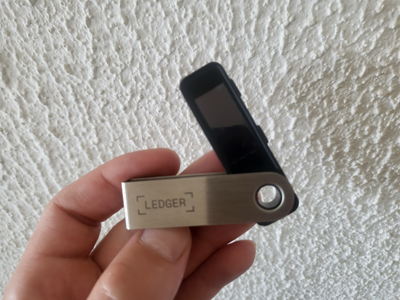
Ledger Nano S Plus is one of the best entry-level hardware wallets in 2026, offering the same core security as premium Ledger devices at a much lower price. It supports 5,500+ cryptocurrencies, integrates with Ledger Live, and allows you to manage staking, NFTs, and DeFi — all while keeping your private keys offline.
Unlike the Nano X or Stax, it’s a wired-only device, meaning no Bluetooth and no iOS support. But for desktop and Android users, this actually makes it a simple and dependable cold storage solution.
In practice, it’s ideal for users who want maximum security on a budget, or a reliable backup wallet for long-term storage.
My Experience With Ledger Nano S Plus
I wanted to see if the Nano S Plus could really keep up with more expensive wallets — and honestly, it does. You still get the full Ledger Live experience, with staking, app management, and dApp access working just like on higher-end models.
The increased storage makes a big difference — I installed apps for multiple blockchains and still had room left, which wasn’t possible on older devices.
Transaction signing is clear, and everything works smoothly with supported dApps and software wallets. The only real limitation is the lack of Bluetooth, which means you’ll need a cable — especially if you’re using it with Android.
Personally, I now use it as a backup wallet. I restored my Nano X accounts using the same recovery phrase and keep it stored safely. It’s already proven useful more than once, which says a lot about its reliability.
Pros:
✔️ Very affordable hardware wallet
✔️ Same Ledger security (CC EAL5+ Secure Element)
✔️ Supports 5,500+ coins, tokens, and NFTs
✔️ Large app capacity (up to ~100 apps)
✔️ Works with desktop and Android
Cons:
❌ No Bluetooth connectivity
❌ No iOS support
❌ Requires cable for all usage
✅ Verdict
- Best for: Users who want a low-cost hardware wallet for secure long-term storage
- Main strength: Offers the same core security and Ledger ecosystem support as premium models at a much lower price
- Main drawback: No Bluetooth or iOS support, requiring a wired connection for all usage
- Who should use it: Users who want a simple, affordable hardware wallet for secure long-term storage
🔗 View full list of supported cryptocurrencies
Price: $49
🎁 Ledger Nano S Plus Special Offer
By using our exclusive link, you’ll get access to any bonus perks Ledger occasionally offers—like free Bitcoin, discounted bundles, or early access deals.
If you’re looking for a safe and reliable way to store your crypto, hardware wallets remain the best option in 2026. Whether you’re a beginner or an experienced investor, the right device can help you protect your assets and stay in full control. Choose the hardware wallet that best fits your needs and security preferences.
Do Hardware Wallets Support All Blockchains?
Most hardware wallets support a wide range of blockchain networks, but compatibility depends on the device, its software, and the apps you install.
Leading wallets like Ledger, SecuX, and D’CENT support major ecosystems such as Bitcoin, Ethereum, Solana, XRP, Avalanche, and BNB Chain. However, some blockchains require additional integration through third-party wallets.
For example, networks like Cardano, Hedera, or Polkadot often rely on dedicated apps such as Eternl, HashPack, or Talisman when used with a hardware wallet.
Because of this, it’s always important to check compatibility before choosing a wallet—especially if you’re active across multiple ecosystems.
Hardware Wallet Guides for Specific Blockchains
Hardware wallets support a wide range of blockchain networks, but compatibility and features can vary depending on the ecosystem you use. If you’re managing assets on specific blockchains, you can explore our detailed guides covering the best hardware wallets for each network.
• Best hardware wallets for XRP
• Best hardware wallets for Tron (TRX)
• Best hardware wallets for Hedera Hashgraph (HBAR)
• Best hardware wallets for Solana (SOL)
• Best hardware wallets for BNB Chain
• Best hardware wallets for Avalanche (AVAX)
• Best hardware wallets for Cardano (ADA)
• Best hardware wallets for MetaMask users
Hardware Wallet Tutorials
Want to go beyond storage? These step-by-step tutorials show how to stake assets, connect wallets, and safely use your hardware wallet across different networks:
• Stake Cosmos (ATOM) using a Ledger hardware wallet
• Polkadot (DOT) staking from Ledger Live
Using Ledger with Popular Wallets
Want to use your hardware wallet with dApps, staking, or specific networks? If you’re using Ledger devices like Ledger Flex, Ledger Stax, Nano X, or Nano S Plus, you’ll often need to connect them to ecosystem-specific wallets.
These step-by-step guides show how to securely connect your Ledger device to some of the most popular Web3 wallets across different blockchains:
Cardano Wallets
• How To Connect Ledger Flex to Yoroi
• How To Connect Ledger Flex to Eternl
• How To Connect Ledger Flex to VESPR Mobile Wallet
Solana Wallets
• How To Connect Ledger Flex to Phantom
Avalanche Wallets
• How To Connect Ledger Flex to Core Wallet
Tron & Hedera Wallets
• How To Connect Ledger Flex to TronLink
• How To Connect Ledger Flex to HashPack
These tutorials help you safely interact with different ecosystems while keeping your private keys protected on your hardware wallet.
Each of these wallets offers strong protection, so the right choice comes down to your budget, preferred device (mobile vs desktop), and how often you interact with crypto.
