


Want to stake your Cardano (ADA) and earn rewards securely in 2026? We’ve tested the best ADA wallets — from hardware to lightweight browser extensions — to help you stake safely and maximize passive income.
🔗 Also read: 8 Best Cardano Wallets to Use in 2026
🔐 Looking for cold storage? See our full guide to the 5 Best Hardware Wallets for Cardano
Stake Your ADA With:
- Ledger Hardware Wallets
- Yoroi Wallet (Browser & Mobile Light Wallet)
- VESPR Wallet (Browser & Mobile Light Wallet)
- Eternl Wallet (Browser & Mobile)
- Lace Wallet (Browser Extension by IOG)
- NuFi Wallet (Browser Wallet with Multichain Support)
- Daedalus Wallet (Full Node Desktop Wallet)
What is Cardano?
Cardano is a decentralized, proof-of-stake (PoS) blockchain known for its energy efficiency and peer-reviewed approach to development. Built by IOHK (now IOG), Cardano enables smart contracts, decentralized apps (dApps), NFTs, and native assets using its ADA cryptocurrency.
Today, Cardano supports 3,300+ staking pools, making it one of the most accessible and decentralized staking ecosystems in crypto.
What Is Cardano ADA Staking?
Staking ADA means delegating your coins to a stake pool to support the network and earn rewards — without giving up ownership. You can:
- Stake directly from a wallet
- Unstake anytime
- Keep full access to your funds
- Earn compound rewards every 5-day epoch
All while contributing to Cardano’s decentralization.
Avoid staking on exchanges — they control your private keys and can freeze your funds.
🔐 Not your keys, not your crypto.
How Much Can You Earn Staking ADA?
As of 2026, Cardano staking rewards offer an APY of ~2% to 4%. Returns may vary slightly based on stake pool performance and saturation.
When Do Cardano Staking Rewards Start?
You’ll get your first rewards after about 15–20 days (3–4 epochs). After that, new rewards will be paid out every 5 days per epoch. If you’d like to learn more about Cardano staking technical details, such as stake pool saturation, pledge, or fixed fees, you can check out our full guide here.
🔐 Types of Cardano Wallets: Hot vs Cold
When you create a Cardano wallet, two key components are generated:
- Private Key: This proves ownership of your wallet and signs transactions.
- Public Key: This generates receiving addresses you can share with others.
You’ll also receive a recovery phrase (also known as a seed phrase or mnemonic phrase). This is your master backup. If you ever lose access to your device, you can use this phrase to restore your wallet on a new one.
⚠️ Never share your recovery phrase. Anyone with access to it can steal your funds.
There are two main types of Cardano wallets:
🔸 Hot Wallets (Software Wallets)
These are connected to the internet and include:
- Browser extension wallets (like Lace and Nufi)
- Mobile wallets (like Yoroi, VESPR, and Eternl mobile)
- Desktop wallets (Daedalus)
Hot wallets are convenient for daily use, dApps, NFTs, and fast staking. However, your recovery phrase is shown on-screen during setup, making it more vulnerable if your device is compromised.
🔸 Cold Wallets (Hardware Wallets)
These are physical devices like Ledger Nano X or Ledger Stax that store your private keys offline.
- Your recovery phrase is shown only on the device screen, never online.
- Transactions are signed internally on the hardware wallet and must be physically confirmed.
- Can be paired with Cardano hot wallets (such as Eternl, Nufi, or Daedalus) for additional functionality.
🔐 Cold wallets are the most secure way to store and stake ADA — ideal for long-term holders and large balances.
How to Stake ADA Safely: The Wallets You Can Trust
Hardware wallets are the most secure way to stake Cardano (ADA). When you connect them to a software wallet like Eternl or Daedalus, the private key never leaves your device — only the public key is used to interact with the blockchain. That means you can send, receive, delegate, and interact with dApps, while your ADA remains fully protected.
Below is our curated list of the 7 best Cardano wallets for staking ADA in 2026 — starting with Ledger hardware wallets, followed by top hot wallets like Eternl, Yoroi, and Lace.
1. Ledger Hardware Wallets
Best Cold Wallets for Staking Cardano ADA
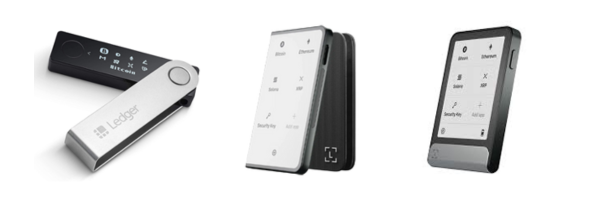
Ledger hardware wallets have been trusted companions of Cardano holders since the early days of the blockchain. Whether you’re just entering the staking ecosystem or upgrading from an older device, Ledger offers a range of options to suit every budget and security preference.
You can choose between:
- Ledger Nano X — $149: A reliable, battle-tested choice for secure staking and storage.
- Ledger Flex — $249: A modern foldable hardware wallet with enhanced durability and portability.
- Ledger Stax — $399: The flagship model with an e-ink curved touchscreen and premium feel.
🆕 Most of the Cardano stakers are now upgrading to Flex or Stax, but Nano X is still a solid and fully supported option for staking ADA without compromise.
All three Ledger wallets are:
✅ Compatible with Windows, macOS, Linux, Android, and iOS
✅ Fully integrated with Ledger Live, Ledger’s secure management suite
✅ Able to stake ADA and claim rewards every 5 days (one epoch)
✅ Secure by design — your private key never leaves the device
Through Ledger Live, you can easily buy, swap, send, and stake ADA in a safe environment, all while retaining full control over your keys.
How to Stake ADA Using Ledger Live (Step-by-Step)
Here’s how you can stake your Cardano (ADA) directly through Ledger Live in just a few minutes:
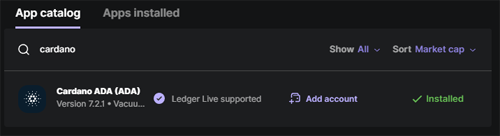
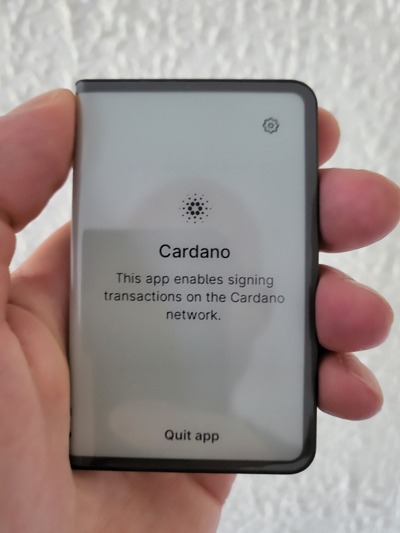
1. Open Ledger Live and install the Cardano app
Go to the My Ledger tab and install the Cardano app from the App catalog.
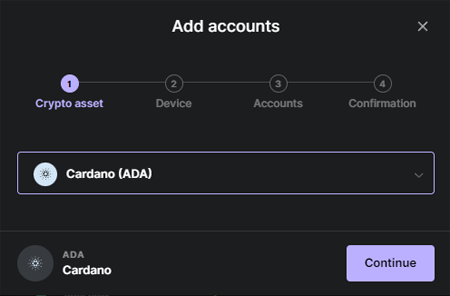
2. Navigate to the Accounts tab and add a new Cardano account to manage your ADA.
3. Transfer ADA to your new Ledger account, or purchase it directly through Ledger Live.
4. Open your Cardano account and click the “Earn” tab
This is where you’ll access staking options for Cardano.
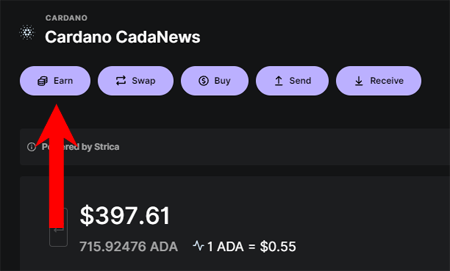
5. You can browse from thousands of pools or simply delegate to Ledger’s default pool.
6. Follow the on-screen instructions and confirm the delegation on your Ledger Stax, Flex, or Nano X.
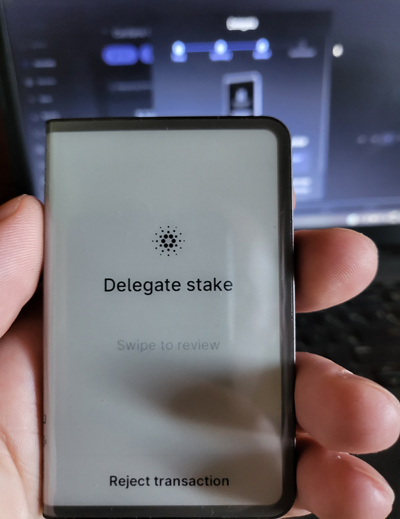
7. Done — you’ve started earning ADA staking rewards.
Why I Stake ADA with Ledger
For many years, I’ve been staking Cardano using Ledger hardware wallets — from the original Nano X to the newer generation devices. In terms of both user experience and security, the Ledger Stax stands out as a truly next-level wallet.
The touchscreen interface, smoother navigation, and premium build quality make everyday interactions — like staking ADA or approving transactions — feel seamless. And as always, my private keys remain 100% offline.
Now that we’ve covered the safest way to stake ADA with Ledger, let’s look at the top hot wallets — including Yoroi, Daedalus, and newer options like Lace and Vespr.
2. Yoroi Wallet (Browser & Mobile Light Wallet)

Developed by Emurgo, Yoroi is a fast and lightweight wallet ideal for beginners.
- Quick setup on browser or mobile
- Supports staking, sending, receiving, and managing ADA and tokens
- Maintained by one of Cardano’s founding entities
How to Stake ADA Using Yoroi Wallet (Step-by-Step)
Here’s how you can stake ADA from the Yoroi wallet in just a few minutes:
1. Download Yoroi Wallet
Get the latest version from the official website and install it on your device.
For the purpose of this tutorial, we’ll be using the Browser Extension version.
2. Create or Restore Your Wallet
Follow the prompts to create a new wallet and back up your recovery phrase, or restore an existing wallet if you already have one.
3. Deposit or Buy ADA
Send ADA to your Yoroi wallet receiving address, or buy it directly through the Yoroi interface.
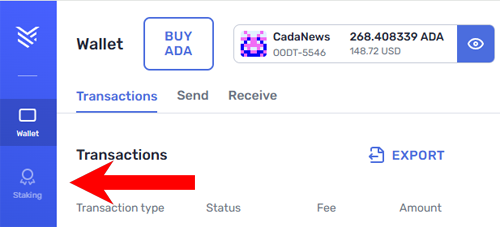
4. Click the Staking Tab
Open Yoroi and click the Staking tab to access the staking dashboard, where you’ll see available pools and your delegation status.
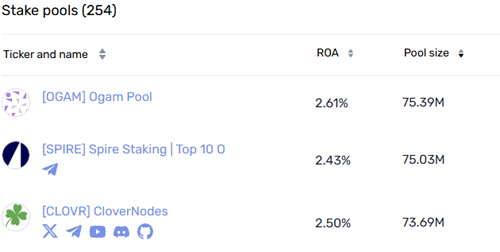
5. Select a Stake Pool
Choose a stake pool to delegate your ADA. Yoroi has its own pool if you prefer. You can check the ROA (annual return) for each pool before deciding.
6. Delegate Your ADA
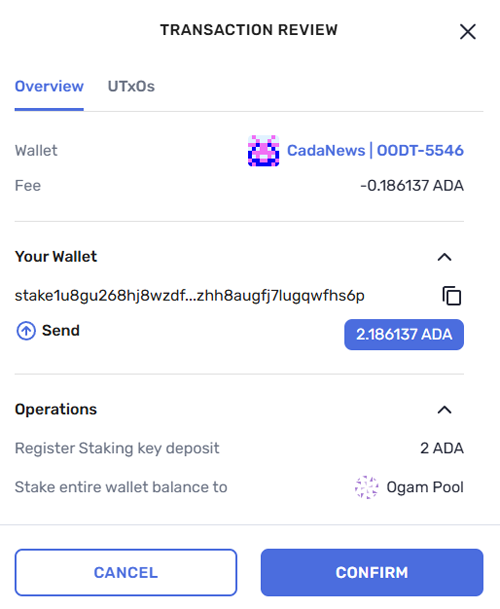
Click Delegate next to your chosen stake pool. A confirmation window will appear — review the details carefully, then click Confirm to delegate all your ADA.
7. Done
On your Staking dashboard, you can now track your staking activity, including total rewards earned, total ADA delegated, and your stake pool’s performance. You’ll also see the option to undelegate anytime if you wish to switch pools or stop staking.
3. VESPR Wallet (Mobile & Browser Light Wallet)

VESPR is a clean, lightweight Cardano wallet designed with a mobile-first experience in mind — perfect for users who want to stake ADA on the go.
- Available as a mobile app and browser extension
- Supports ADA staking, sending, and receiving
- Simple, user-friendly UI for beginners
- Actively maintained and open-source
How to Stake ADA Using VESPR Wallet (Step-by-Step)
Here’s how you can stake ADA from the VESPR wallet in just a few minutes:
1. Download VESPR Wallet
Get the latest version from the official website and install it on your device.
For the purpose of this tutorial, we’ll be using the Mobile version.
2. Create or Restore Your Wallet
Follow the prompts to create a new wallet and back up your recovery phrase, or restore an existing wallet if you already have one.
3. Deposit or Buy ADA
Send ADA to your VESPR wallet receiving address, or buy it directly through the VESPR interface.
4. Open the Staking Dashboard
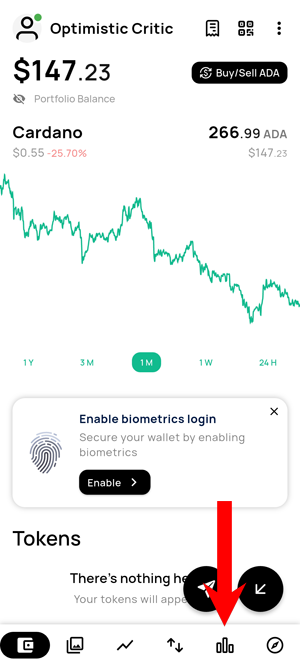
Open VESPR and click the Staking tab in the bottom right corner to access the staking dashboard.
5. Select the Stake Pool
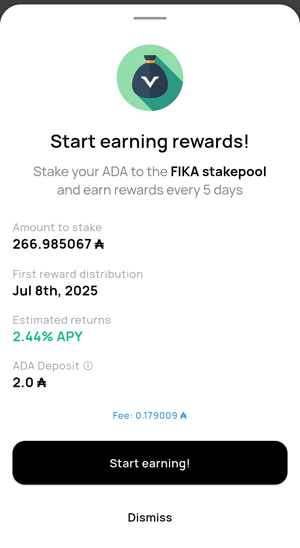
VESPR will present you with a pool you can stake to (in our case, the FIKA stake pool), but you’re also able to browse other stake pools and select the one you find most appropriate. You can view the current APY before proceeding. If you’re satisfied with the rate, click Start Earning! to continue.
6. Done
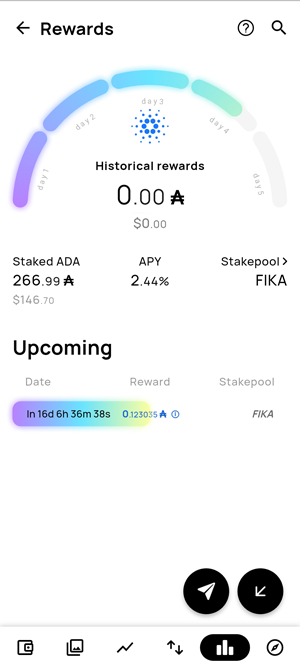
Your ADA is now staked. In the Staking dashboard, you can view your staked ADA, the current APY, and the time remaining until your next rewards.
4. Eternl Wallet (Browser & Mobile)

Community-driven and feature-rich, Eternl has become one of the most popular Cardano wallets.
- ADA staking, token/NFT management, dApp access, and governance
- Works well as both a browser extension wallet and a mobile app
- Trusted by the Cardano community
How to Stake ADA Using Eternl Wallet (Step-by-Step)
Here’s how you can stake ADA from the Eternl wallet in just a few minutes:
1. Download Eternl Wallet
Get the latest version for iOS, Android, or Chrome Browser extension and install it on your device.
For the purpose of this tutorial, we’ll be using the Browser Extension version.
2. Create or Restore Your Wallet
Follow the prompts to create a new wallet and back up your recovery phrase, or restore an existing wallet if you already have one.
3. Deposit or Buy ADA
Send ADA to your Eternl wallet receiving address, or buy it directly through the Eternl interface.
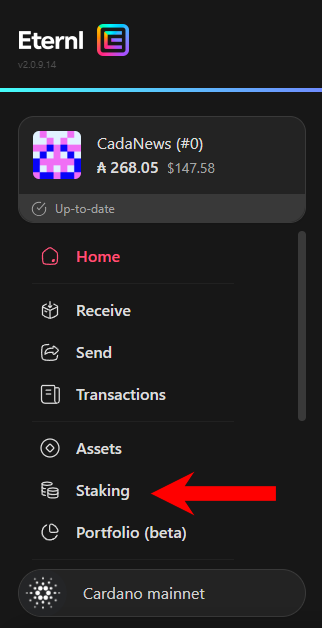
4. Click the Staking Tab
Open Eternl and click the Staking tab to access the staking dashboard, where you’ll see available pools and your delegation status.
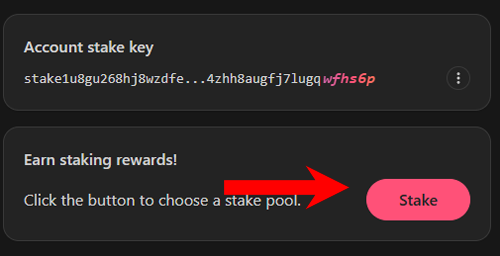
5. Click the Stake Button
In the staking dashboard, click the Stake button to begin the delegation process and choose your stake pool.
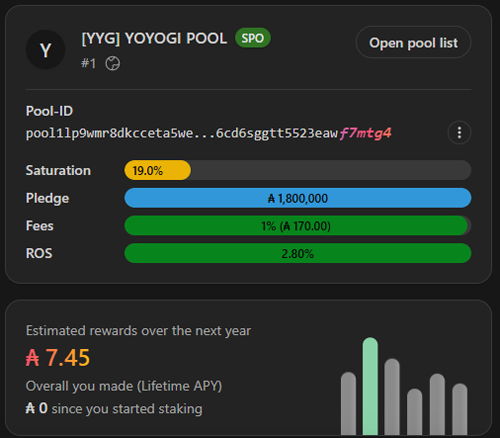
6. Choose a Stake Pool and Delegate
Select the stake pool you want to delegate your ADA to, then click Delegate to proceed.
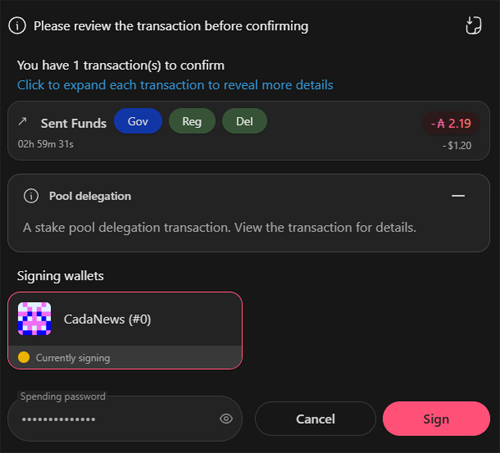
7. Confirm the Delegation
Enter your spending password and click Sign to complete the delegation.
8. Done
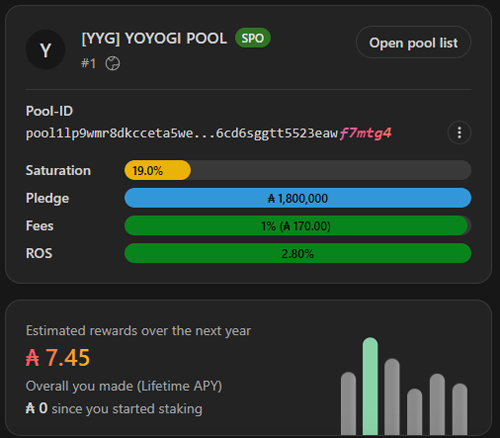
Your ADA is now staked. In the Staking dashboard, you can track your stake pool’s performance and see estimated rewards over the next year.
5. Lace Wallet (Browser Extension by IOG)

Lace is Cardano’s official light wallet, developed by Input Output Global.
- Smooth UI, fast staking, and dApp access
- Native support for ADA, tokens, NFTs, and multi-delegation (upcoming features)
- Built for both beginners and power users
How to Stake ADA Using Lace Wallet (Step-by-Step)
Here’s how you can stake ADA from the Lace wallet in just a few minutes:
1. Download Lace Wallet
Get the latest version of the browser extension from the official website and install it on your device.
2. Create or Restore Your Wallet
Follow the prompts to create a new wallet and back up your recovery phrase, or restore an existing wallet if you already have one.
3. Deposit or Buy ADA
Send ADA to your Lace wallet receiving address, or buy it directly through the Lace interface.
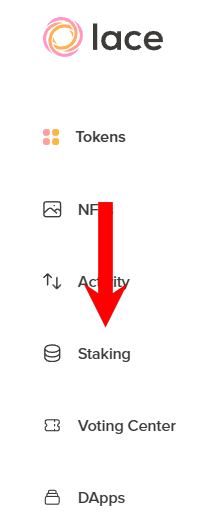
4. Click the Staking Tab
Open Lace and click the Staking tab to access the staking dashboard, where you’ll see available pools and your delegation status.
5. Choose a Stake Pool
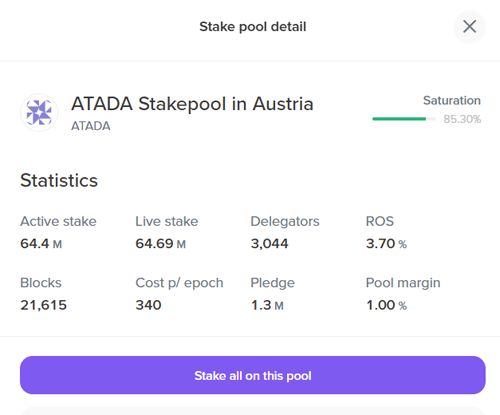
Browse the available pools. A green circle indicates the pool is healthy and not over-saturated. Click on your chosen pool, then select Stake all on this pool to delegate your ADA.
Tip: Lace also lets you delegate to up to 10 pools at once if you prefer to diversify your stake.
7. Confirm Your Delegation
Click the Confirm New Portfolio button, then enter your spending password to complete the delegation.
8. Done
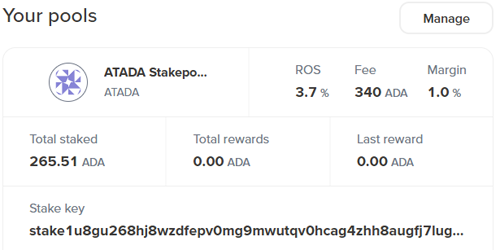
Your ADA is now staked. You can track your stake pools, total rewards, and performance anytime in the Your Pools section.
6. NuFi Wallet (Browser Wallet with Multichain Support)

NuFi supports Cardano, Polkadot, Solana, and more — ideal for users managing multi-chain assets.
- Stake ADA securely with built-in delegation tools
- Integrated NFT gallery and Web3 dApp support
- Developed by the team behind the popular ADALite wallet
How to Stake ADA Using NuFi Wallet (Step-by-Step)
Here’s how you can stake ADA from the NuFi wallet in just a few minutes:
1. Download NuFi Wallet
Get the latest version of the browser extension from the official website and install it on your device.
2. Create or Restore Your Wallet
Follow the prompts to create a new wallet and back up your recovery phrase, or restore an existing wallet if you already have one.
3. Deposit or Buy ADA
Send ADA to your NuFi wallet receiving address, or buy it directly through the NuFi interface.
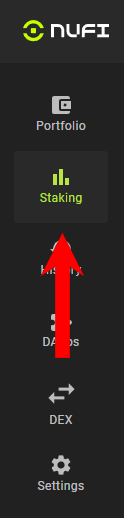
4. Click the Staking Tab
Open NuFi and click the Staking tab to access the staking dashboard.
5. Start Staking
Click the My Staking tab. Next to your Cardano wallet, click Start Staking to begin the delegation process.
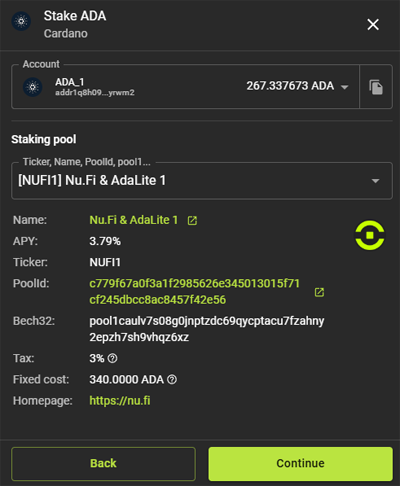
6. Choose a Stake Pool
Click Stake ADA. In the new window, you can either select a stake pool from the list or delegate to the NuFi pool, which offers stable performance and a good APY. When you’re ready, click Continue to proceed.
7. Confirm the Delegation
Enter your spending password and click Submit to complete the delegation process.
8. Done
Your ADA is now staked. Under the Stake Accounts tab, you can see the current APY, total ADA staked, and your reward balance.
7. Daedalus Wallet (Full Node Desktop Wallet)

Built by IOG (the creators of Cardano), Daedalus is a full-node wallet that downloads and validates the entire blockchain for maximum trust and decentralization.
- Supports staking, token management, and governance voting.
- Best for advanced users with a dedicated machine.
- Setup takes ~2 hours for full sync.
Daedalus is considered safer than other Cardano software (hot) wallets because it runs as a full node and independently verifies the entire blockchain. However, it takes approximately 2 hours to sync before you can start using it. If the wallet hasn’t been opened for some time, it will also require additional time to resync with the blockchain at startup. If you prefer a lightweight wallet that doesn’t require full-chain downloads, consider the other options in this article.
