

Want to stake Cardano (ADA) and earn rewards in 2026? In this guide, we cover 5 of the best Cardano wallets for staking ADA — all easy to use, secure, and available right now.
These are Cardano-native wallets, meaning they’re built specifically for the ecosystem and let you delegate ADA, track rewards, and keep full control of your funds at all times.
Whether you’re just getting started or already holding ADA, you can start staking in minutes — no lockups, no minimums, and no need to give up ownership of your coins.
💡 Tip: Most of these wallets also integrate with hardware wallets for extra protection. If you want maximum security, check our guide to the best Cardano hardware wallets.
Stake ADA With These 5 Wallets:
- Yoroi Wallet (Beginner-friendly)
- VESPR Wallet (Mobile-first)
- Eternl Wallet (Advanced features)
- Lace Wallet (Official Cardano wallet)
- NuFi Wallet (Multichain support)
Best Cardano Wallets for Staking ADA (Step-by-Step Guides)
Below you’ll find the best Cardano wallets for staking ADA, along with step-by-step tutorials and images showing exactly how to delegate your ADA and start earning rewards.
1. Yoroi Wallet (Beginner-friendly)

Developed by Emurgo, Yoroi is a fast and lightweight wallet ideal for beginners.
- Quick setup on browser or mobile
- Supports staking, sending, receiving, and managing ADA and tokens
- Maintained by one of Cardano’s founding entities
How to Stake ADA Using Yoroi Wallet (Step-by-Step)
Here’s how you can stake ADA from the Yoroi wallet in just a few minutes:
1. Download Yoroi Wallet
Get the latest version from the official website and install it on your device.
For the purpose of this tutorial, we’ll be using the Browser Extensionversion.
2. Create or Restore Your Wallet
Follow the prompts to create a new wallet and back up your recovery phrase, or restore an existing wallet if you already have one.
3. Deposit or Buy ADA
Send ADA to your Yoroi wallet receiving address, or buy it directly through the Yoroi interface.
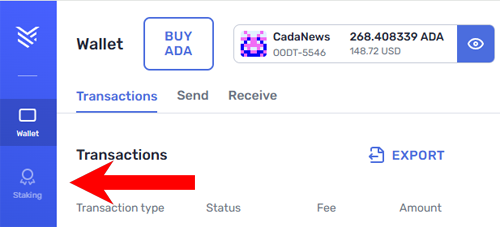
4. Click the Staking Tab
Open Yoroi and click the Staking tab to access the staking dashboard, where you’ll see available pools and your delegation status.
5. Select a Stake Pool
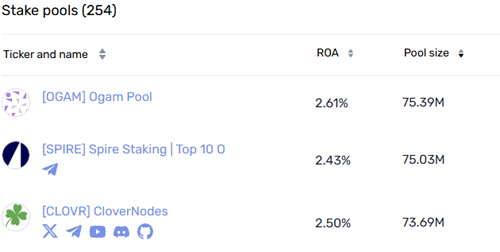
Choose a stake pool to delegate your ADA. Yoroi has its own pool if you prefer. You can check the ROA (annual return) for each pool before deciding.
6. Delegate Your ADA
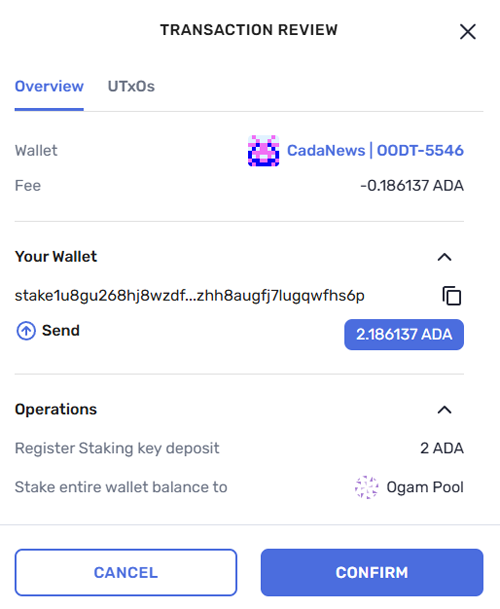
Click Delegate next to your chosen stake pool. A confirmation window will appear — review the details carefully, then click Confirm to delegate all your ADA.
7. Done
On your Staking dashboard, you can now track your staking activity, including total rewards earned, total ADA delegated, and your stake pool’s performance. You’ll also see the option to undelegate anytime if you wish to switch pools or stop staking.
2. VESPR Wallet (Mobile-first)

VESPR is a clean, lightweight Cardano wallet designed with a mobile-first experience in mind — perfect for users who want to stake ADA on the go.
- Available as a mobile app and browser extension
- Supports ADA staking, sending, and receiving
- Simple, user-friendly UI for beginners
- Actively maintained and open-source
How to Stake ADA Using VESPR Wallet (Step-by-Step)
Here’s how you can stake ADA from the VESPR wallet in just a few minutes:
1. Download VESPR Wallet
Get the latest version from the official website and install it on your device.
For the purpose of this tutorial, we’ll be using the Mobileversion.
2. Create or Restore Your Wallet
Follow the prompts to create a new wallet and back up your recovery phrase, or restore an existing wallet if you already have one.
3. Deposit or Buy ADA
Send ADA to your VESPR wallet receiving address, or buy it directly through the VESPR interface.
4. Open the Staking Dashboard
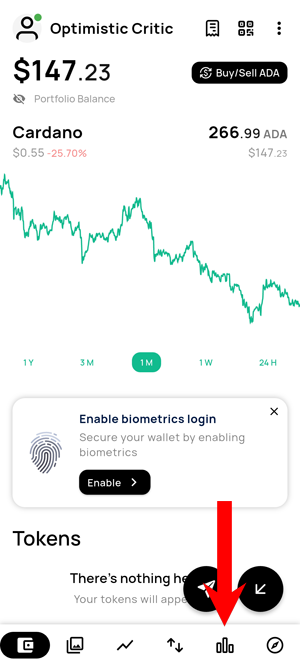
Open VESPR and click the Staking tab in the bottom right corner to access the staking dashboard.
5. Select the Stake Pool
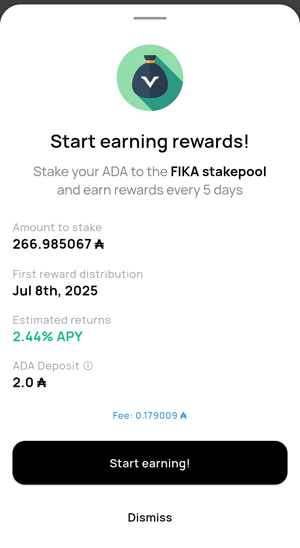
VESPR will present you with a pool you can stake to (in our case, the FIKA stake pool), but you’re also able to browse other stake pools and select the one you find most appropriate. You can view the current APY before proceeding. If you’re satisfied with the rate, click Start Earning! to continue.
6. Done
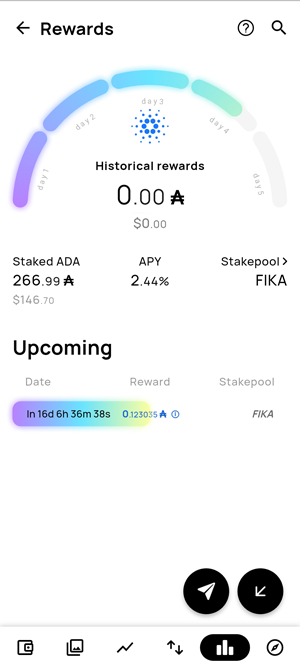
Your ADA is now staked. In the Staking dashboard, you can view your staked ADA, the current APY, and the time remaining until your next rewards.
3. Eternl Wallet (Advanced features)

Community-driven and feature-rich, Eternl has become one of the most popular Cardano wallets.
- ADA staking, token/NFT management, dApp access, and governance
- Works well as both a browser extension wallet and a mobile app
- Trusted by the Cardano community
How to Stake ADA Using Eternl Wallet (Step-by-Step)
Here’s how you can stake ADA from the Eternl wallet in just a few minutes:
1. Download Eternl Wallet
Get the latest version for iOS, Android, or Chrome Browser extension and install it on your device.
For the purpose of this tutorial, we’ll be using the Browser Extension version.
2. Create or Restore Your Wallet
Follow the prompts to create a new wallet and back up your recovery phrase, or restore an existing wallet if you already have one.
3. Deposit or Buy ADA
Send ADA to your Eternl wallet receiving address, or buy it directly through the Eternl interface.
4. Click the Staking Tab
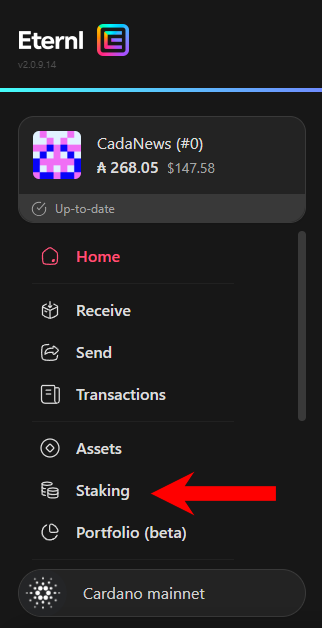
Open Eternl and click the Staking tab to access the staking dashboard, where you’ll see available pools and your delegation status.
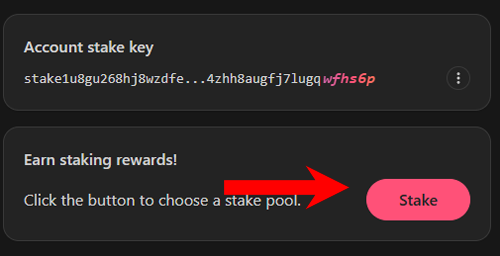
5. Click the Stake Button
In the staking dashboard, click the Stake button to begin the delegation process and choose your stake pool.
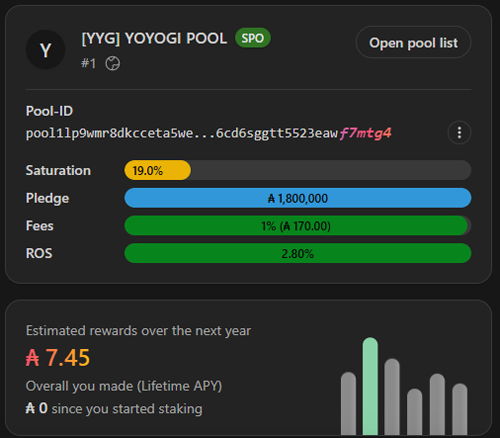
6. Choose a Stake Pool and Delegate
Select the stake pool you want to delegate your ADA to, then click Delegate to proceed.
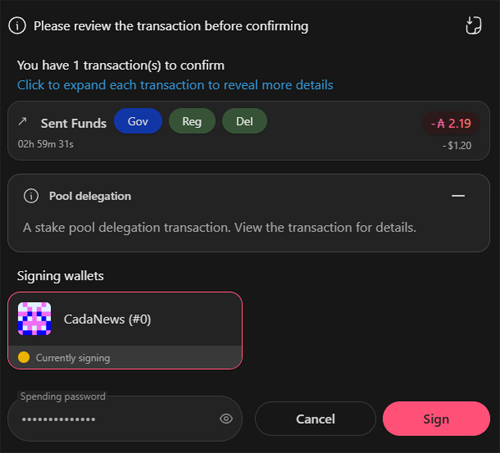
7. Confirm the Delegation
Enter your spending password and click Sign to complete the delegation.
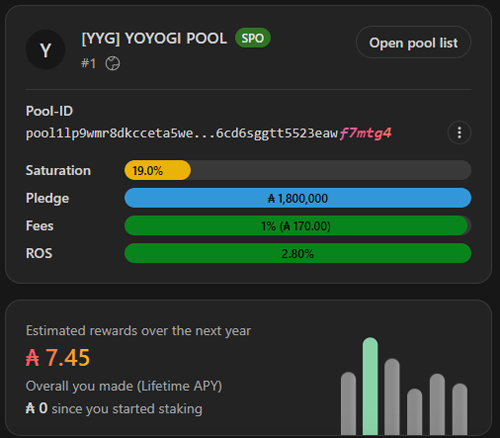
8. Done
Your ADA is now staked. In the Staking dashboard, you can track your stake pool’s performance and see estimated rewards over the next year.
4. Lace Wallet (Official Cardano wallet)

Lace is Cardano’s official light wallet, developed by Input Output Global.
- Smooth UI, fast staking, and dApp access
- Native support for ADA, tokens, NFTs, and multi-delegation (upcoming features)
- Built for both beginners and power users
How to Stake ADA Using Lace Wallet (Step-by-Step)
Here’s how you can stake ADA from the Lace wallet in just a few minutes:
1.Download Lace Wallet
Get the latest version of the browser extension from the official website and install it on your device.
2. Create or Restore Your Wallet
Follow the prompts to create a new wallet and back up your recovery phrase, or restore an existing wallet if you already have one.
3. Deposit or Buy ADA
Send ADA to your Lace wallet receiving address, or buy it directly through the Lace interface.
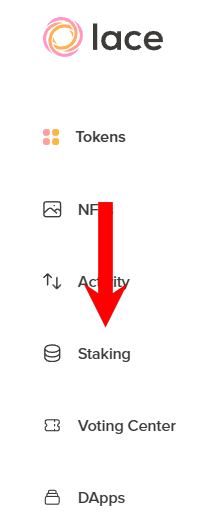
4. Click the Staking Tab
Open Lace and click the Staking tab to access the staking dashboard, where you’ll see available pools and your delegation status.
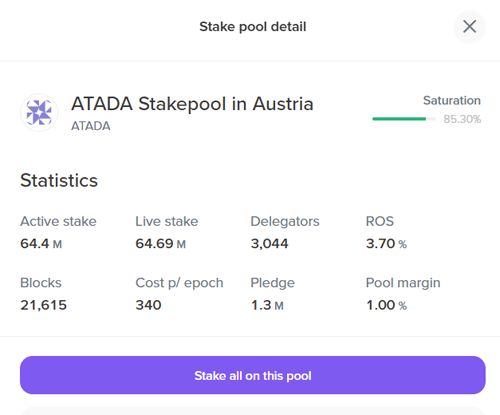
5. Choose a Stake Pool
Browse the available pools. A green circle indicates the pool is healthy and not over-saturated. Click on your chosen pool, then select Stake all on this pool to delegate your ADA.
Tip: Lace also lets you delegate to up to 10 pools at once if you prefer to diversify your stake.
6. Confirm Your Delegation
Click the Confirm New Portfolio button, then enter your spending password to complete the delegation.
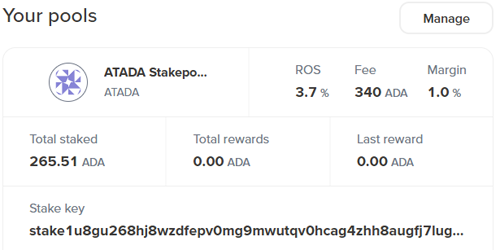
7. Done
Your ADA is now staked. You can track your stake pools, total rewards, and performance anytime in the Your Pools section.
5. NuFi Wallet (Multichain support)

NuFi supports Cardano, Polkadot, Solana, and more — ideal for users managing multi-chain assets.
- Stake ADA securely with built-in delegation tools
- Integrated NFT gallery and Web3 dApp support
- Developed by the team behind the popular ADALite wallet
How to Stake ADA Using NuFi Wallet (Step-by-Step)
Here’s how you can stake ADA from the NuFi wallet in just a few minutes:
1. Download NuFi Wallet
Get the latest version of the browser extension from the official website and install it on your device.
2. Create or Restore Your Wallet
Follow the prompts to create a new wallet and back up your recovery phrase, or restore an existing wallet if you already have one.
3. Deposit or Buy ADA
Send ADA to your NuFi wallet receiving address, or buy it directly through the NuFi interface.
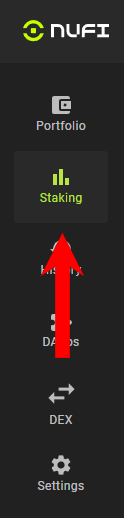
4. Click the Staking Tab
Open NuFi and click the Staking tab to access the staking dashboard.
5. Start Staking
Click the My Staking tab. Next to your Cardano wallet, click Start Staking to begin the delegation process.
6. Choose a Stake Pool
Click Stake ADA. In the new window, you can either select a stake pool from the list or delegate to the NuFi pool, which offers stable performance and a good APY. When you’re ready, click Continue to proceed.
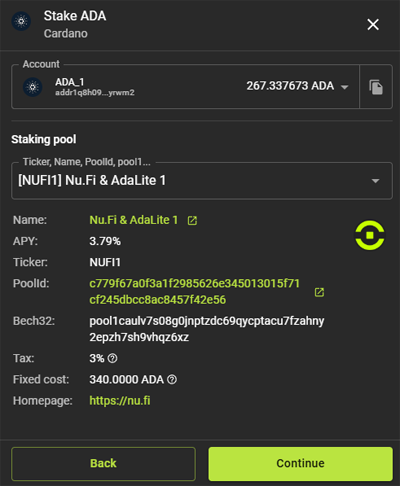
7. Confirm the Delegation
Enter your spending password and click Submit to complete the delegation process.
8. Done
Your ADA is now staked. Under the Stake Accounts tab, you can see the current APY, total ADA staked, and your reward balance.
