

Stake is a very popular crypto casino that allows deposits and withdrawals with 20+ cryptocurrencies across multiple networks. If you are looking for the best wallet to use with Stake, you should go with a non-custodial wallet that gives you full control over your crypto, but also keeps your activity more private.
All of the wallets we selected:
- support all cryptocurrencies accepted by Stake, including Bitcoin, Ethereum, Solana, and many others
- allow you to manage USDT across Stake-supported networks like Ethereum, BNB Chain, Tron, Polygon, and Solana
- offer fast transactions and low fees for smooth deposits and withdrawals
- are fully compatible with Stake deposits and withdrawals
- are fully secure non-custodial wallets
From my experience, it’s better not to use exchange (custodial) wallets for casino transactions. In some cases, exchanges can report your gambling activity or even freeze your account. I’ve always used non-custodial wallets and had no issues.
When testing Stake, I had to go through personal and document verification, which slowed things down. If you want to start playing with crypto instantly, you can check our No-KYC crypto casino guides by cryptocurrency.
We made sure to include only multi-currency wallets, so you don’t need separate wallets for different networks. These are wallets you can install, save your recovery phrase in a safe place, and start using right away. The goal here is simple — a wallet that is non-custodial, secure, fully functional, and fast when handling transactions.
If you are using specific networks/currencies like Solana or Ethereum, you can also go with wallets like Phantom (SOL) or MetaMask (ETH). However, for Stake it’s much more practical to use a multi-currency wallet so you don’t need to switch between different apps.
Best Crypto Wallets for Stake Casino
- Exodus – Best Overall Wallet for Stake
- Trust Wallet – Best Browser Extension Wallet for Stake
- OKX Wallet – Best Mobile Wallet for Stake
1. Exodus – Best Overall Wallet for Stake

Exodus is a non-custodial crypto wallet with a very polished, secure, and fast mobile app, which makes it a strong choice for Stake. While the desktop version is quite famous, for Stake purposes the mobile app is more practical and works smoothly.
You can manage all cryptocurrencies accepted on Stake, including USDT across 9 different networks, which gives you flexibility when choosing how to deposit. Inside the app, you can buy a large number of cryptocurrencies using MoonPay or Ramp Network, allowing you to compare rates and get the best deal.
From my experience, Exodus is very easy to use and everything feels clean and responsive. You can set a passcode or fingerprint lock for additional security, and transaction fees are usually well set, so your crypto moves quickly without delays.
Another big advantage is connectivity. You can connect Exodus directly to Stake on mobile, or use QR code and WalletConnect to link it with the Stake web version. I tested both, and everything worked smoothly without any issues.
In everyday use, Exodus feels fast, reliable, and very user-friendly, especially if you prefer managing your crypto from your phone.
✅ Verdict
- Best for: Mobile users who want a smooth and fast wallet for Stake
- Main strength: Clean mobile experience with easy buying and multi-network support
- Main drawback: Limited customization and advanced features compared to some wallets
- Who should use it: Users who want a simple, multi-device wallet with strong mobile performance
Depositing BNB from Exodus to Stake
1. I logged in to my Stake account on mobile.
2. In my Stake wallet, I selected BNB as the deposit method and chose “Use Your Wallet” for direct wallet connection.
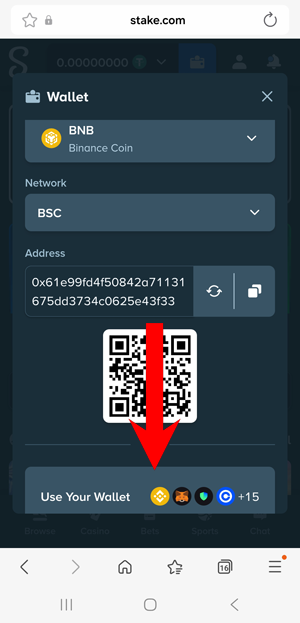
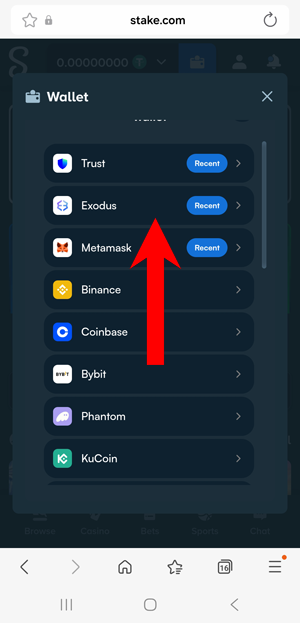
3. I selected my Exodus mobile wallet to connect to Stake.
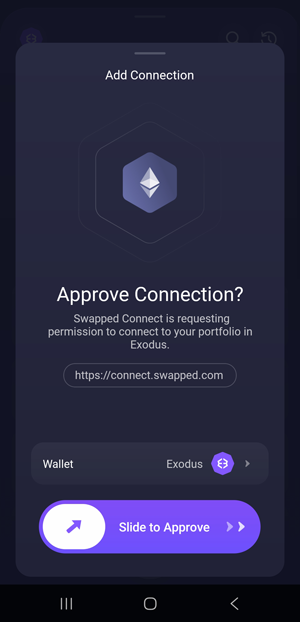
4. I approved the connection request inside my Exodus wallet.
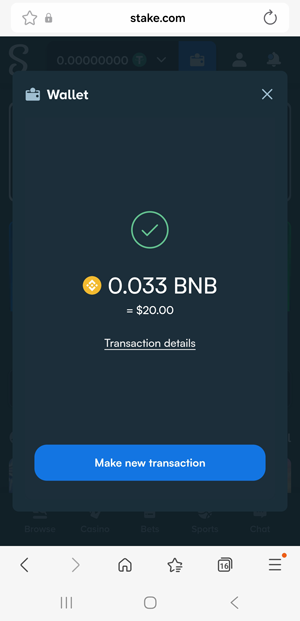
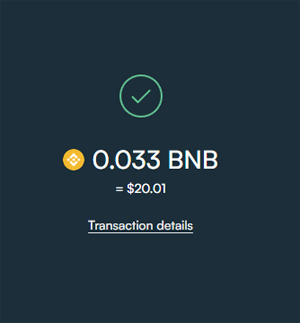
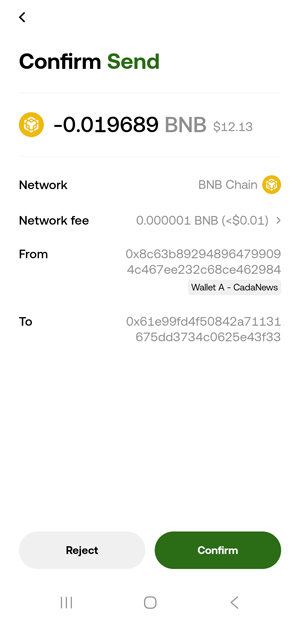
5. I entered the deposit amount (in my case, $20 worth of BNB) and confirmed the transaction in Exodus.
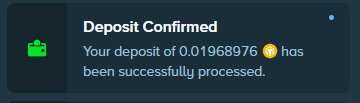
6. The deposit was confirmed shortly after, and the funds appeared in my Stake account, ready to use.
2. Trust Wallet – Best Browser Extension Wallet for Stake

Trust Wallet is a non-custodial crypto wallet with over 50 million users, available as both a mobile app and browser extension, so you can manage your crypto across multiple devices. It supports all cryptocurrencies available on Stake, along with 20+ networks for USDT transactions, which gives you a lot of flexibility when depositing or withdrawing.
Inside the app, you can buy a large number of coins and tokens using options like Google Pay, P2P, and 12+ providers, allowing you to compare rates and choose the best deal. This makes it easy to get started without relying on external platforms.
From my experience, moving crypto with Trust Wallet is smooth and reliable. Fees are usually well set, so transactions go through without getting stuck, even during congestion on some networks.
For additional security, you can enable biometric authentication, which adds a simple extra layer when accessing your wallet. Stake also allows direct connection with Trust Wallet, both on mobile and desktop.
The browser extension works great — it connects directly to Stake and makes deposits very quick and easy. However, I did run into issues when using the mobile version for direct deposits. That said, you can still send funds manually by copying the deposit address or using a QR code, so it’s not a blocker.
In everyday use, Trust Wallet feels fast, practical, and flexible, especially when using the browser extension for smoother interaction with Stake.
✅ Verdict
- Best for: Using Stake through browser with quick and direct wallet connection
- Main strength: Strong multi-chain support with 12+ in-app purchase providers
- Main drawback: Mobile version has issues when connecting directly to Stake
- Who should use it: Users who prefer a browser extension wallet for smooth Stake connection
3. OKX Wallet – Best Mobile Wallet for Stake

OKX Wallet is a non-custodial crypto wallet available as both a mobile app and browser extension, with both versions working well for managing crypto. It supports all cryptocurrencies available on Stake, along with USDT transactions across 40+ networks, giving you a lot of flexibility when depositing or withdrawing.
One of the strongest features is the integrated swap, which allows you to swap coins and tokens across 30+ networks directly inside the wallet. This is very useful when preparing funds for Stake without needing external platforms.
From my experience, OKX Wallet works fast and reliably, especially when handling multi-chain transactions. For additional security, you can secure your wallet using a passkey, which adds an extra layer of protection.
One thing to note is that you cannot buy crypto directly inside the wallet, so you will need to fund it from another source. It’s also a bit more complicated to connect OKX Wallet directly to Stake, so I recommend using deposit addresses or QR codes to easily send and receive funds.
In everyday use, OKX Wallet feels powerful and flexible, especially if you are dealing with multiple networks.
✅ Verdict
- Best for: Mobile users who want strong multi-chain support for Stake
- Main strength: Powerful multi-chain swap across 30+ networks
- Main drawback: Interface can feel a bit confusing at the start for beginners
- Who should use it: Users who want a flexible wallet for managing crypto across many networks
Choosing the right wallet for Stake comes down to speed, ease of use, and flexibility across networks. All of the wallets above work well in real use, so it mainly depends on whether you prefer mobile, browser, or multi-device access.
